

TikTok Ad Testing: The Framework That Kills Wasted Spend
Start with an always-on testing campaign that isolates the hook first and measures 6-second view rate as your primary distribution signal, then hand the winners to CBO or Smart+ once your pixel has enough volume to feed them. That’s it. That’s the whole game plan in one sentence.
Before you launch anything, pick your KPI. ROAS or CPA for e-commerce, CPI if you’re running an app. Then test exactly one variable per experiment. Here’s how you know you’ve got a winner on your hands:
- 6-second view rate at or above the recommended benchmark for strong distribution
- CTR at or above the recommended benchmark indicating strong conversion intent
- CVR at or above the recommended benchmark indicating strong landing page effectiveness (then confirm CPA/ROAS actually holds up)
Turn on your Pixel and Events API before you spend a dollar. Set a minimum budget per creative. Run for 5 to 7 days before you make any calls.
Pro Tip: Start broad on targeting and keep every ad group setting identical across your test. The only thing that should differ is the creative itself, so the algorithm’s optimization signal comes purely from what people see, not from targeting noise muddying the data.
Key Takeaways
Reliable TikTok ad testing depends on isolating one variable at a time, prioritizing 6-second view rate as your primary signal, and validating concepts before they consume live budget.
| Point | Details |
|---|---|
| Test one variable only | Change hook, CTA, or targeting independently, never together, to isolate what actually drove the result. |
| Watch 6-second view rate first | TikTok’s algorithm rewards hold rate above 10% with cheaper distribution and wider reach. |
| Budget for 500 clicks per creative | At 1.5% CTR, that means roughly 33,000 impressions, or about $200 at $6 CPM. |
| Run tests 5 to 7 days | Shorter windows miss day-of-week variance; the full learning phase needs roughly 25 conversions. |
| Pre-validate before live testing | POPJAM.IO simulates audience reactions to filter weak concepts before they hit Ads Manager. |
Table of Contents
- What TikTok Ad Testing Actually Covers
- The 3-Tier Testing System (Run This Every Week)
- How Do I Set Up a Split Test in TikTok Ads Manager?
- Which Metrics Actually Predict TikTok Ad Success?
- What Budget and Sample Size Do You Actually Need?
- Why Is My TikTok Ad Test Failing? A Troubleshooting Checklist
- Stop Burning Budget on Concepts You Haven’t Validated
- Sources
- FAQ
What TikTok Ad Testing Actually Covers
TikTok ad testing means running controlled experiments that compare creative, targeting, bidding, or budget while holding everything else fixed. That’s the whole discipline. It sounds simple, but most accounts break the rule constantly by changing two things at once and then guessing which one moved the needle.
Use TikTok’s native Split Testing feature when you want statistical automation handling the math for you. If your budget is tight, run manual parallel ad groups instead. Multivariate and multi-arm approaches exist too, but TikTok itself pushes you toward isolating one variable at a time because compound tests make it nearly impossible to attribute a result to a specific change.
The tools that make this work: TikTok Ads Manager for setup, Split Testing for automated comparison, Smart+ for automated scaling once you have data, Campaign Budget Optimization (CBO) for budget allocation across ad groups, and the TikTok Pixel plus Events API for tracking what actually converts.
The 3-Tier Testing System (Run This Every Week)
Systematizing your creative pipeline beats ad-hoc testing every time, and the operators who treat testing as a repeatable system consistently outperform teams that just throw creatives at the wall.
Here’s the structure:
- Tier 1: Concept tests. High volume, low spend. You’re screening ideas, not optimizing them.
- Tier 2: Hook iteration. Take whatever survived Tier 1 and rework just the first three seconds. This is where most of your creative energy should go.
- Tier 3: Scale validation. Stress-test your surviving winners at higher budgets to confirm they hold up once real money is behind them.
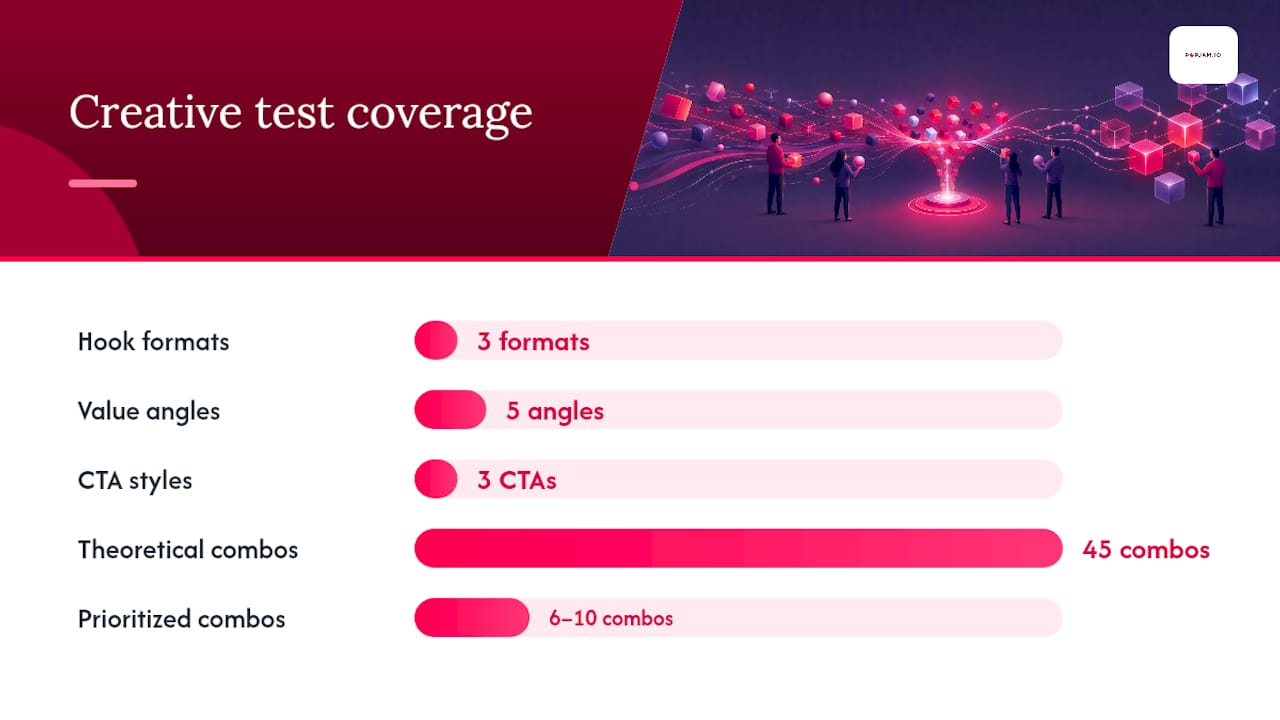
Layer the 3-5-3 creative framework on top: test 3 hook formats, 5 value angles, and 3 CTA styles. That’s 45 theoretical combinations, but you don’t need to run all of them. Prioritize the 6 to 10 combos your gut and early data suggest are most promising.
Change one variable at a time, every time. Use identical ad group settings and equal budget splits so nothing but the creative explains the difference in results.
Build a decision scorecard with thresholds for hook rate, 6-second view rate, CTR, CVR, and CPA. Anything below threshold gets cut. Anything above moves to the next tier.
Pro Tip: Brief your creators on the concept, not a locked script. Give them the message and let them shoot loosely, then reuse the same raw footage to cut three or four different hook edits. You’ll multiply your test volume without multiplying your production cost.
Keep a shared test log. Document your hypothesis before you launch, not after you see results. Review it weekly with your team.
How Do I Set Up a Split Test in TikTok Ads Manager?
Before you touch Split Test, run this checklist:
- Confirm your Ads Manager account is active and properly configured
- Verify the Pixel is installed and firing correctly
- Connect the Events API alongside the Pixel
- Confirm your conversion events are verified and mapped correctly
- Check for duplicate pixel events, which silently corrupt your data
Once that’s clean, toggle on Split Test inside Ads Manager. Select the variable you’re testing (creative, targeting, or bid), set a duration of at least 7 days, and check the “Estimated Testing Power” TikTok shows you before launch. TikTok’s own Split Test documentation recommends aiming for at least 80% power before you commit budget to a test.
If your budget doesn’t support Split Test’s traffic requirements, run manual parallel ad groups instead. Give each identical settings and equal budgets, and disable CBO so nothing shifts spend between groups mid-test. That keeps the comparison clean.
Smart+ works, but only under specific conditions. Enable it only for conversion objectives once you’re generating 50 or more weekly pixel events and can commit at least $50 a day. It won’t work well with manual bid caps or narrow audience exclusions since the automation needs room to learn.
For CBO, use it at the campaign level when you’re testing across multiple audience segments simultaneously. The algorithm typically reallocates budget across ad groups within 48 to 72 hours as it identifies what’s working.
Pro Tip: Resist touching anything during the learning phase. Wait until you hit minimum impression and conversion thresholds before you call a test one way or the other, even if early numbers look rough.
Which Metrics Actually Predict TikTok Ad Success?
Not every metric deserves your attention equally. Here’s the hierarchy, in order:
- 6-second view rate — the primary distribution signal the algorithm rewards
- CTR — signals conversion intent once someone’s watched
- CVR — reflects your landing page experience
- CPA/ROAS — the business outcome that actually pays the bills
TikTok’s algorithm weighs 6-second view rate above CTR when deciding distribution. A creative that holds attention past that first hook window gets cheaper impressions and wider reach, regardless of how compelling the click-through offer looks.
Use these as your benchmarks: 6-second view rate of 10% or better is strong, CTR above 1.0% is strong, CVR above 1.5% is strong.
The tactics that actually move these numbers: swap your hook in the first 2 to 3 seconds, lean into native UGC style over polished production, add text-on-screen captions, and test trending sound against original audio. Clarity in your CTA and offer matters more than cleverness.

When results don’t line up, that mismatch tells a story. Low view rate paired with high CTR means your hook is failing but your offer is landing with whoever survives it. Low CTR paired with a strong view rate usually points to a weak CTA or an offer that doesn’t match what the hook promised.
What Budget and Sample Size Do You Actually Need?
Plan for roughly 500 clicks per creative variation to reach 95% confidence at a 20% minimum detectable effect. Here’s how that translates into real numbers.
At a typical 1.5% CTR, 500 clicks means you need about 33,000 impressions per creative. At a $6 CPM, that’s roughly $200 per creative variation. Testing 6 creatives at once runs about $1,200 spread across 5 to 7 days.
For daily minimums, budget $20 to $50 per ad group during standard testing. If you’re running CBO or Smart+ flows, plan for a $50 per day campaign minimum, with the same $50 per day per ad group during your validation tiers.
Give tests 5 to 7 days minimum to smooth out day-of-week variance. TikTok’s full learning phase generally runs about 7 days or roughly 25 conversions, with results stabilizing closer to 50 conversions. Refresh creative on a cycle of roughly 21 to 28 days to stay ahead of fatigue, though high-volume accounts sometimes need to refresh weekly.
Why Is My TikTok Ad Test Failing? A Troubleshooting Checklist
Start with the boring stuff, since it’s usually the culprit:
- Check for pixel misfires or duplicate events corrupting your data
- Confirm your audience size isn’t too narrow to deliver
- Check whether your bid is set too low to compete for inventory
- Look at hold rate: is the creative failing to keep attention?
- Check for a landing page mismatch between what the ad promises and what the page delivers
Once tracking is clean, diagnose by the numbers. Build a fresh hypothesis, don’t patch a failing concept.
On attribution, expect TikTok’s engaged-view numbers to run 15 to 25% higher than what you see in GA4 or Shopify. That gap is normal.
For low distribution specifically: broaden your targeting, raise bids toward the suggested range, confirm your ad group budget is sufficient, and add fresh creatives built around strong hooks rather than iterating endlessly on a weak one. Root-cause analysis like this is worth building into your regular optimization routine rather than treating as a one-off fire drill.
Cutting Wasted Spend Before You Ever Open Ads Manager
Every dollar you spend testing a bad concept in Ads Manager is a dollar you didn’t need to spend. That’s the entire case for pre-launch validation with AI, and it’s why more teams are running synthetic audience simulations before a creative ever goes live.
The mechanism is straightforward: AI generates likely audience reactions to a concept, surfaces which hooks and CTAs resonate with specific psychographic segments, and gives you qualitative and quantitative feedback before you’ve spent a cent on media. Fold that into your Tier 1 process and you filter your 45 theoretical 3-5-3 combinations down to the 6 to 10 that actually deserve live budget.
Testing pre-launch with synthetic personas doesn’t replace live testing. It replaces the guesswork of deciding which concepts are worth testing live in the first place.
Pro Tip: Use AI feedback to kill low-probability concepts before they ever touch your ad account. Every concept you filter out beforehand is testing velocity and budget you get to spend on concepts that actually have a shot.
A Few Rules We Keep Coming Back To
The accounts that win consistently aren’t the ones with the biggest budgets. They’re the ones with discipline. Ship creative fast, test hooks before anything else, never touch more than one variable at once, and write down your hypothesis before you see the result, not after.
Scaling has its own rules. Remix a winning creative into new formats instead of retiring it the moment performance dips.
For measurement beyond platform-reported numbers, TikTok’s Brand Lift Study and Conversion Lift Study give you an independent read on whether your ads are actually driving incremental outcomes, not just correlating with them.
Stop Burning Budget on Concepts You Haven’t Validated
Every test in this playbook still costs money once it’s live in Ads Manager. POPJAM.IO exists to cut that cost before you ever get there. It generates platform-ready TikTok ad concepts and runs them against synthetic audience personas first, surfacing which hooks, angles, and CTAs actually resonate before a single impression gets served.
Fold it into the workflow this way: ideate your concepts, run them through AI pre-validation, then move only the strongest performers into Tier 1 live testing, Tier 2 hook iteration, and Tier 3 scale validation. The concepts that would have burned through your Tier 1 budget with no signal get filtered out before they cost you anything. That means fewer low-signal live tests, faster learning cycles, and less spend wasted during concept discovery, exactly the phase where most testing budgets leak.
Try the AI ad generator and run your next batch of concepts through pre-validation before your next campaign launch.
Sources
- TikTok Advertising Guide: Strategy & Analytics (2026)
- How to Build a TikTok Ad Testing System That Actually Scales – D2C Times
FAQ
What Is the 3-Second Rule on TikTok?
It refers to the idea that viewers decide whether to keep watching within the first 3 seconds, which is why hook testing focuses so heavily on that opening window. TikTok’s own distribution signal, 6-second view rate, extends that logic slightly further to measure whether a hook actually held attention.
How Do You Become a Tester for TikTok?
TikTok doesn’t run a public consumer “ad tester” program the way some platforms do. Advertisers test their own ads directly inside TikTok Ads Manager using Split Testing or manual parallel ad groups.
Why Does TikTok Feel Like It’s Mostly Ads Now?
TikTok’s ad load has grown as the platform scales its advertiser base and pushes automated formats like Smart+, which surface more sponsored content into feeds as advertisers lean on CBO and algorithmic scaling. There’s no official published figure confirming a specific ad percentage of feed content.
How Do I View a TikTok Ad Preview?
Inside TikTok Ads Manager, open your campaign and ad group, then select the ad you want to check and use the built-in preview panel, which shows exactly how the ad renders on a mobile device before it goes live.
How Long Should I Run a TikTok Ad Test Before Deciding?
Run tests for a minimum of 5 to 7 days to account for day-of-week variance and give TikTok’s learning phase enough data, generally around 25 conversions, to stabilize before you call a winner.