

Email Subject Line Testing: A Practical A/B Playbook
Unlock higher open rates with effective email subject line testing. Discover practical A/B strategies to boost engagement and revenue.

Run a controlled A/B test with one variable, a hypothesis you write down before you hit send, and a downstream metric you picked in advance. That’s the fastest path to reliable answers about what actually moves opens, clicks, replies, or revenue. The rest of this guide walks through which test types fit your list, how to structure the experiment, which tools to trust, and how to read results that go beyond a vanity open rate.
TL;DR:
- Running A/B tests on subject lines is suitable for lists of a few hundred contacts, while A/B/n and multivariate tests require larger audiences and longer timelines.
- A defensible test must isolate one variable, have a predetermined hypothesis, and wait 24 to 48 hours or longer for downstream metrics to stabilize before declaring a winner.
- Tools scoring subject lines provide ideation help but cannot accurately determine audience preferences; live testing remains essential for reliable results.
- The best success metric depends on campaign goals; conversions or replies are more trustworthy than open rates affected by privacy features like Apple’s Mail Privacy Protection.
- Consistent documentation and analysis of test results over time improve campaign learning, and testing discipline outweighs sheer volume of tests.
Table of Contents
- What Types of Subject Line Tests Should You Run?
- How Do You Run a Defensible Subject Line A/B Test?
- Which Subject Line Testers and A/B Tools Actually Help?
- How Do You Choose the Right Win Metric?
- Subject Line Templates and Test Hypotheses You Can Use Today
- Applying Synthetic Audience Testing to Subject Line Decisions
- How Long Does a Full Subject Line Test Take?
- How Do You Read Results Beyond Open Rate?
- What Pitfalls Sink Most Subject Line Tests?
- What Do Real Subject Line Test Results Look Like?
- Turn Testing Into a Repeatable System
- Why Testing Discipline Beats Testing Volume
- Sources
- FAQ
What Types of Subject Line Tests Should You Run?
Not every list needs the same experiment. The format you choose depends on how many contacts you have and how much risk you can absorb if a variant underperforms.
A/B testing compares two subject lines head to head. It’s the default for most teams because it isolates one variable and gives you a clean read. A/B/n testing extends this to three or more variants at once, useful when you have a big list and want to compare multiple angles (say, urgency versus curiosity versus personalization) in a single send. Multivariate testing changes several elements simultaneously (subject line, preview text, sender name) and requires a much larger sample to separate the effects, so it’s better suited to enterprise senders with six-figure lists. Holdout testing sends the winning variant to a small test group first, then rolls it out to the remaining list once a winner is confirmed, protecting most of your audience from an underperforming line.
- A/B: best default; works for lists as small as a few hundred contacts.
- A/B/n: needs more volume; good when you have three or more genuinely different hypotheses to test.
- Multivariate: needs enterprise-scale volume; expect weeks, not days, to reach significance.
- Holdout: lowest risk; ideal when open rate swings could hurt revenue on a big send.
For smaller lists, keep it simple with a straight A/B. Save multivariate or sophisticated holdout designs for lists large enough to protect the bulk of your audience while still learning something.
How Do You Run a Defensible Subject Line A/B Test?
A defensible test isolates a single variable, states a hypothesis before launch, and locks in a win metric ahead of time, according to the subject-line testing playbook from Merge. Skip any of those three and you’re not testing, you’re guessing with extra steps.
Here’s the sequence that holds up under scrutiny:
- Write the hypothesis first. “Adding the recipient’s first name will increase click-through rate by at least 10%” is testable. “Let’s try something more fun” is not.
- Isolate one variable. Change only the subject line length, only the emoji, only the personalization token. Change two things and you won’t know which one caused the shift.
- Choose your split. For lists under 1,000 contacts, a straight 50/50 split works fine. For larger lists, a 20/80 holdout sends variants to 20% of contacts, then routes the winner to the remaining 80%, which limits exposure if one version flops.
- Freeze everything else. Same send time, same segment, same body copy, same sender name. Any other change contaminates your result.
- Pick the win metric before launch, not after you see which number looks better.
- Let it run to significance, then roll out the winner and log why you think it won.
Pro Tip: Resist the urge to call a winner after two hours of data. Early opens often favor whichever variant landed first in someone’s inbox that morning, not the one that’s genuinely better. Give the test enough time to include at least one full engagement cycle, typically 24 to 48 hours, before declaring a result.
Document the reasoning behind every winner, not just the phrase that won. A line that worked because it named a specific discount teaches you something reusable; a line you can’t explain teaches you nothing.
Which Subject Line Testers and A/B Tools Actually Help?
Free scoring tools are good for ideation. They are not a substitute for a live test against your own audience.

Tools like Omnisend’s subject line tester score a line from 0 to 100 based on length, wording, and mobile scannability, then show a preview of how it’ll render on a phone. MailerLite’s tester goes further, checking readability against the Flesch-Kincaid scale, flagging spam-trigger words, and reviewing capitalization and emoji use. A review of four free testers found that scoring varies meaningfully from tool to tool, so running a line through two or three scorers before you commit to a final list of variants tends to surface more usable feedback than relying on just one.
Where testers fall short is verdicts. They can’t tell you whether your specific audience clicks more on questions or statements. That answer only comes from a live send. Mailchimp’s Subject Line Helper tries to close that gap by pairing real-time scoring with built-in A/B test automation, so ideation and execution happen in the same workflow.
When picking a tool, check for:
- Randomized send assignment (not just alphabetical splitting)
- Reporting broken out by opens, clicks, and conversions, not just opens
- Native support for holdout rollouts if your list is large
How Do You Choose the Right Win Metric?
Open rate is the easiest metric to see and the least trustworthy one to act on. Apple’s Mail Privacy Protection and similar features can inflate opens artificially, which makes a subject line look like a winner when it did nothing for revenue.
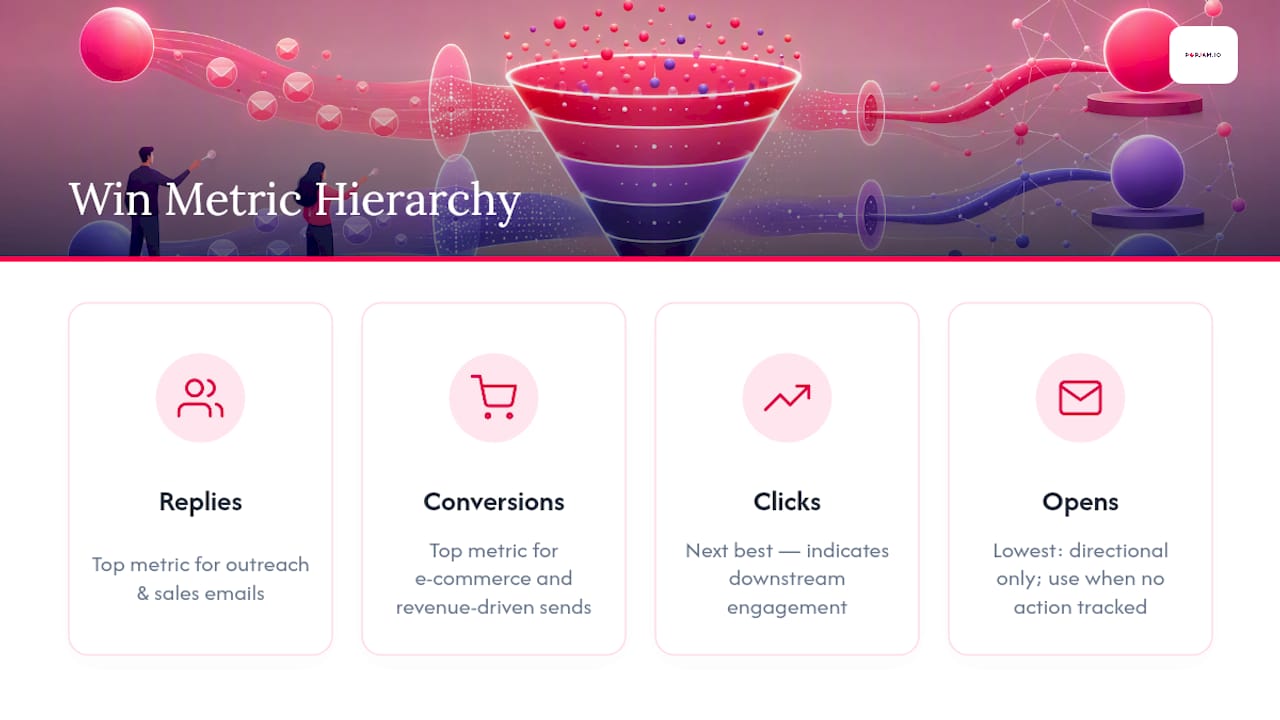
A more honest hierarchy: replies or conversations rank highest for outreach and sales emails, conversions rank highest for e-commerce and revenue-driven sends, clicks come next, and opens trail behind as a directional signal at best. The Merge playbook makes the same case: pick the metric tied to the actual goal of the campaign, not the one that updates fastest in your dashboard.
Opens still have a place. They’re useful for testing curiosity-driven angles or measuring inbox visibility when you have no downstream action to track, like a plain-text announcement with no link. But when a subject line test feeds a purchase funnel, judging it on opens alone risks optimizing for clickbait that never converts.
Statistical significance in practice: most marketing teams don’t run formal p-value calculations, and you don’t need to. A simpler rule works: wait until each variant has enough sends to produce a meaningful sample (generally several hundred opens or clicks per variant for smaller effects), and don’t call a winner if the gap is inside the noise you’d expect from day-to-day variance. If your downstream metric (clicks or conversions) hasn’t stabilized by the time opens have, extend the test rather than declaring victory early.
Subject Line Templates and Test Hypotheses You Can Use Today
Templates give you a starting point. Hypotheses tell you what you’re actually trying to learn.
Promo: “48 hours only: [X]% off” versus “Your discount expires soon” tests urgency phrasing against implied urgency. Newsletter: “This week’s biggest story” versus “3 things worth your time” tests curiosity against a listicle format. Cart recovery: “You left something behind” versus “Still thinking about [item name]?” tests personalization against a soft nudge. Cold outreach: “Quick question about [company]” versus “[Name], saw your post about [topic]” tests specificity against name-based personalization.
Keep the first 30 characters doing the heavy lifting since mobile inboxes often truncate anything beyond that, and pair your subject line with preview text that adds new information rather than repeating the subject verbatim.
Applying Synthetic Audience Testing to Subject Line Decisions
Before you spend list volume on a live A/B, AI-simulated persona feedback can help you narrow ten subject-line candidates down to two worth actually testing. This won’t replace a real send, since actual audience behavior still has the final word, but it shortens the ideation cycle considerably.
Pre-testing creative against synthetic personas before a live send helps marketing teams catch weak angles early, the same principle behind testing ad creatives before launch applies directly to subject-line ideation.
For high-stakes sends (product launches, big promotions), simulation plus a live holdout test together give you both speed and confidence.
How Long Does a Full Subject Line Test Take?
A single-variable A/B test on an active list typically takes one to two weeks from setup to a defensible answer, though the exact timeline depends on send frequency and list size.
Setup itself, writing the hypothesis, drafting variants, and configuring the split, usually takes under an hour if you already know what you’re testing. The send and initial engagement window (opens and clicks) generally resolves within 24 to 48 hours for consumer email, since most engagement happens in the first day. Where timelines stretch is downstream metrics. If your win metric is a purchase, a reply, or a demo booking, you need enough time for that action to actually occur, which can mean waiting three to seven additional days depending on your typical sales cycle or purchase consideration window.
For weekly newsletters or recurring campaigns, many teams run one subject-line variable test per send and accumulate learnings over a month rather than trying to force a single conclusive test in one cycle. That’s often more realistic than trying to reach airtight significance in a single week, especially for lists under 5,000 contacts where daily volume limits how fast you accumulate data.
The practical rule: budget one week minimum for engagement-based metrics like opens and clicks, and up to two to three weeks when your win metric is a conversion or reply that depends on a longer customer decision cycle. Rushing this timeline is the single most common reason teams call a false winner.
How Do You Read Results Beyond Open Rate?
Open rate tells you whether a subject line got attention. It says nothing about whether that attention turned into revenue, replies, or engagement worth having.
Start by cross-referencing your win metric against opens for the same test. If Variant A had a higher open rate but Variant B had a higher click-through rate, that’s a real signal that Variant A’s line over-promised or created curiosity that didn’t match the email body. In outreach and sales contexts, the same logic applies to replies. A subject line that generates opens but few replies might be too vague or too clever for the recipient to know what action to take next.
For e-commerce sends, layer in conversion rate and average order value, not just clicks. A subject line that drives more clicks but attracts window-shoppers rather than buyers isn’t actually the stronger performer once you look past the surface number. Segment the results by device type too. Mobile opens and desktop opens often behave differently, and a subject line that reads well on a six-inch screen might get truncated awkwardly on desktop previews.
The most useful habit is building a simple log: subject line, hypothesis, win metric, result, and one sentence on why you think it won or lost. Over a few months, that log becomes a reference document that beats guesswork on every future campaign, and it’s a habit worth building into any message testing workflow your team already runs for other creative formats.
What Pitfalls Sink Most Subject Line Tests?
The most common mistake is calling a winner too early, before the sample size is large enough to rule out random variance.
Testing more than one variable at a time is a close second. Change the subject line and the send time in the same test, and you’ll never know which one drove the result. Another frequent error: letting list segment differences skew the read. If Variant A happens to go to a more engaged segment because of how your ESP split the list, your “winner” might just be measuring audience quality, not subject-line quality.
Watch for these red flags in particular:
- Declaring significance before both variants have meaningful sample sizes
- Testing on a list segment too small to produce a stable signal
- Judging success on open rate alone when the campaign goal is revenue
- Changing send time, sender name, or email body alongside the subject line
- Never revisiting old “winning” formulas to see if audience preferences have shifted
That last point matters more than most teams realize. A subject-line style that won six months ago can fatigue an audience that’s seen it repeated in every campaign since. Treat winners as hypotheses to retest periodically, not permanent rules.
What Do Real Subject Line Test Results Look Like?
Concrete before-and-after examples make the abstract advice above easier to apply. Consider a cart recovery sequence where the baseline subject line reads “Complete your order” and the challenger reads “[First name], your cart is waiting.” If the personalized version lifts click-through rate by a meaningful margin while opens stay roughly flat, that’s a clean signal that personalization affects action, not just curiosity, which is exactly the kind of result worth logging and reusing.
It’s that the urgency alone was already doing the work, and the extra detail didn’t add incremental value for this particular audience.

A cold outreach test comparing “Quick question” against “[Name], saw your recent post about [topic]” often shows the reverse pattern: similar open rates, but a meaningfully higher reply rate for the personalized version, because recipients who open a specific, relevant line are more likely to feel it’s worth a response.
None of these patterns are universal. What matters is that each example ties a subject-line change to a metric that reflects the campaign’s actual goal, then documents why the result likely happened. That habit, more than any single template, is what separates teams that improve steadily from teams that keep guessing.
Turn Testing Into a Repeatable System
The teams that improve email performance quarter over quarter don’t run more tests than everyone else. They run cleaner ones, and they act on the results instead of shelving them.
If subject-line testing is one piece of a bigger creative testing habit, extending that same discipline (hypothesis first, isolate one variable, pick the right metric) to ad creative pays off the same way. POPJAM applies this logic to ad creative generation and testing, using synthetic audience simulation to flag which concepts are worth a real spend before a single dollar goes live. If you’re already thinking this rigorously about subject lines, the AI ad generator extends that same pre-launch testing discipline to the rest of your campaign creative.
Why Testing Discipline Beats Testing Volume
Most teams that struggle with subject-line testing aren’t testing too little. They’re testing sloppily, then trusting a number that never should have decided anything.
The habit that actually compounds is simple: stop treating open rate as the finish line, and start logging every test with its hypothesis and outcome, win or lose, following email marketing best practices. A weekly fifteen-minute review of what you tested and why beats running twice as many tests with no memory of what worked last quarter.
— Doruk
Sources
- Free Email Subject Line Tester | Boost Open Rates | Omnisend
- Email Subject Line Testing: A Practical A/B Playbook
- Free email subject line tester | MailerLite
- 4 free email subject line testers (rated)
- Subject Line Helper | Test & Check Subject Lines | Mailchimp
FAQ
What Is Email Subject Line Testing?
It’s the practice of comparing two or more subject line variants against a live audience segment to see which one performs better against a chosen metric, such as opens, clicks, or conversions. A proper test isolates one variable and defines the win metric before launch.
What Is a Good Subject Line for a Check-In Email?
Simple, direct phrasing tends to work best, such as “Checking in on [topic]” or “Quick update on [project name].” Avoid vague curiosity hooks for check-ins since recipients respond better to clarity about why you’re reaching out.
What Is the Subject Line Preview in an Email?
The preview text (also called preheader text) is the short snippet that appears next to or below the subject line in an inbox, giving recipients a second line of context before they open. Pairing it with the subject line rather than repeating the same words gives readers more reason to click.
What Is a Good Subject Line for a Request Email?
Specific, action-oriented phrasing performs well, such as “Quick favor: 2 minutes on [topic]” or “Need your input by [date].” Naming the exact ask or timeframe in the subject line reduces ambiguity and tends to improve reply rates over vague requests.
How Do You Measure Success in Subject Line Testing?
Success depends on the campaign goal: replies or conversions for outreach and sales emails, clicks for content-driven campaigns, and conversions for e-commerce sends. Open rate alone is rarely sufficient since it doesn’t confirm the recipient took the action the campaign actually needed.