

Ad Formats: Which to Choose for Your Actual Objective
Choose ad formats for your objective: search for purchase intent, video and display for brand building. Test your creatives with POPJAM.


Ad formats are families of creatives (search, display, social, video, native, audio, and digital OOH) that you combine according to the campaign objective. The quick rule: search works best for purchase intent, video and display build brands, responsive ads and carousels drive conversions and performance, and vertical formats dominate app installs. Before committing budget, tools such as POPJAM let you validate those creatives with synthetic audiences.
Key takeaways:
- Choose your ad format based on the objective, such as search for purchase intent or video for awareness, and your priority placements.
- Responsive ads offer broader coverage and automatic optimization, but require versions in different aspect ratios to prevent unwanted cropping.
- Each platform has size and aspect ratio specifications that affect reach and creative quality, such as 4:5 on Meta or 1200x628 on Google Ads.
- Validating creatives with synthetic audiences helps reduce spending and improve reactions before launching campaigns in the real market.
- Producing multiple formats has become standard. The key is to adapt variants quickly to maintain consistency and optimize performance.
Table of contents
- Ad formats: main categories and when to use them
- Responsive ads versus uploaded creatives: which works best in each case
- Platform specifications that help you avoid rework
- How to choose a format: a checklist before producing a single creative
- Validating creatives before spending: what synthetic audiences change
- Which legal and privacy restrictions affect each format
- Where creative production is heading in 2026
- Generate and validate your creatives before spending a euro on media
- Official links for a closer look at specifications
- Sources
- Frequently asked questions
Ad formats: main categories and when to use them
Each family of advertising formats solves a different problem. Confusing them is why many campaigns spend their budget on the wrong channel for their objective.
- Search: text that appears when someone is already actively searching. Its strength is intent: it converts better with fewer impressions and is measured primarily by CPC and conversion rate.
- Display: banners and images that appear while users are browsing something else. It serves awareness and remarketing, and is evaluated through CPM and viewability rather than immediate clicks.
- Social: ads native to the feed on Meta, TikTok, or LinkedIn. They combine reach with precise targeting and work well for both traffic and conversions, depending on the specific format chosen.
- Video: from six-second bumpers to 30-second in-stream ads. It dominates awareness and consideration; its key metric is video completion rate, not just CTR.
- Native: ads that mimic the editorial format of the site where they appear. They create less visual resistance and work best at the top and middle of the funnel.
- Audio and streaming: spots in podcasts or on audio platforms. They increase brand recall among audiences who consume content with the screen off.
- Digital OOH (digital signage): programmatically managed physical screens. It complements offline awareness with the same targeting logic as purely digital advertising.
The combination matters more than choosing a single format in isolation: a launch campaign usually needs video or display to generate demand and search to capture it once the user has decided to buy.
Responsive ads versus uploaded creatives: which works best in each case
A responsive ad is not a fixed design. It is a set of assets (images, headlines, descriptions, and logos) that the platform combines using machine learning to generate thousands of variations adapted to each available space, as Google's own documentation on responsive ads explains.
The benefits are clear: broader network coverage, less manual work per placement, and continuous optimization without human intervention. Google recommends this format as the default when the objective is to maximize display coverage.
The risk is losing control: the system can crop an image in a way that breaks the composition if you have not uploaded enough aspect ratios. Three steps prevent that problem:
- Always upload versions in 1:1, 4:5, and 9:16, never just a single square or landscape format.
- Check how the logo and overlaid text look in each crop before publishing.
- Keep a manually uploaded creative for placements where the exact composition matters, such as a campaign's hero banner.
Pro tip: design in 4:5 for mobile first, then adapt to 1:1 and 9:16 instead of starting with landscape. Cropping a portrait image upward almost always looks better than stretching a landscape image downward.
Platform specifications that help you avoid rework
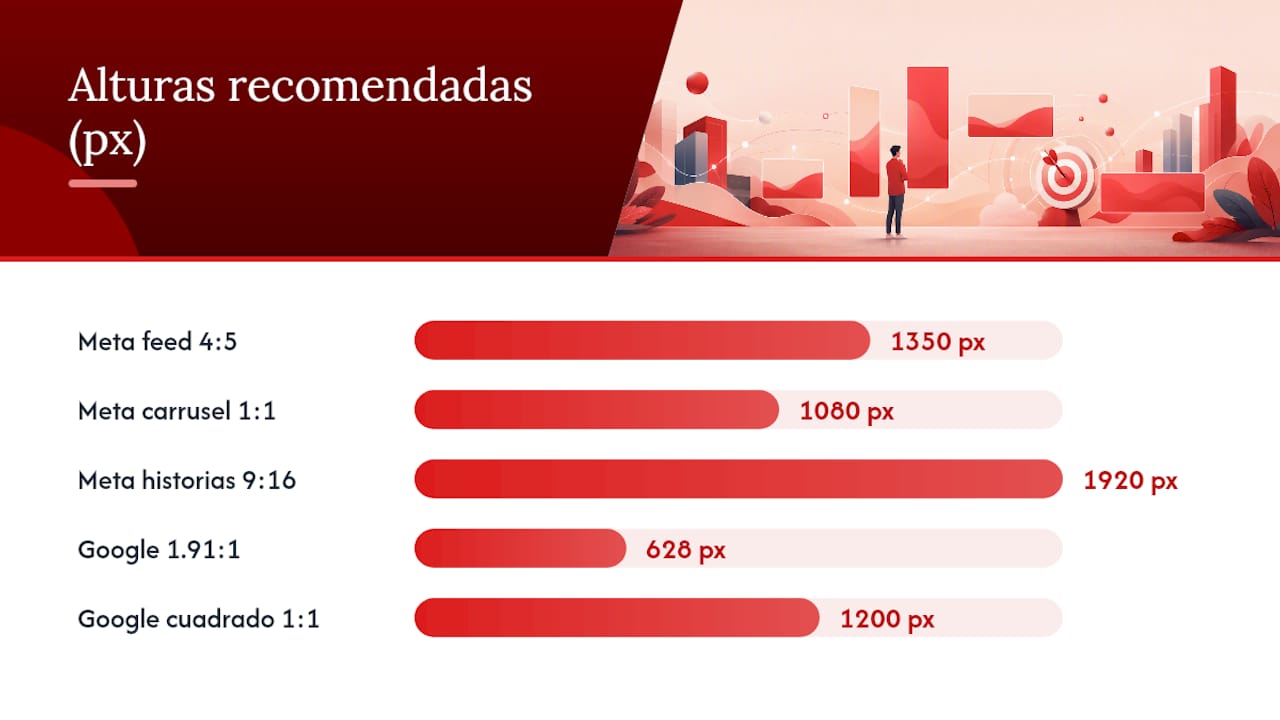
Each platform has its own file limits and recommended aspect ratios. Ignoring them does not always prevent publication, but it can reduce reach or distort the creative.
On Meta (Facebook and Instagram), the practical convention is 4:5 (1080x1350 pixels) for the feed, 1:1 (1080x1080) for carousels and maximum versatility across placements, and 9:16 (1080x1920) for stories and reels; video files can be up to 4 GB, according to the Meta Ads size guide.
According to the official Google Ads help documentation, the file limit for responsive display assets in Google Ads is a moderate size that allows efficient loading, and recommended sizes include landscape and square formats to ensure coverage across the network.
Practical points by platform:
- Google Ads (responsive display): 1200x628 (1.91:1) and 1200x1200 (1:1) cover most placements, and Google maintains a list of common sizes for desktop and mobile.
- YouTube: a minimum resolution of 1080p, H.264 codec, and durations ranging from 6 seconds (bumper) to 15 or 30 seconds (skippable in-stream); the first three seconds determine whether the viewer stays.
- Amazon Ads: featured brand formats require product images on a pure white background, with no overlaid text in the main thumbnail.
- LinkedIn: image carousels work best in 1:1, and longer copy performs better than on Meta because the audience arrives in a professional rather than leisure mindset.
Meta also recommends exporting at higher resolutions to improve sharpness on high-density screens.
How to choose a format: a checklist before producing a single creative
Choosing the format after designing is the wrong way around. The right sequence starts with the objective and ends with production.
- Define the objective and the actual KPI. Search for purchase intent, video or display for awareness, responsive ads and carousels for performance, and vertical formats for app installs.
- Map your priority placements to that objective. A brand launch does not need search from day one; a conversion campaign should not rely solely on static banners.
- Take stock of your assets before production: versions in 4:5, 1:1, and 9:16, a logo on a transparent background, and short headline copy of fewer than 40 characters.
- Prioritize what you will test first. Do not test ten variations at once; start with two or three responsive assets against a fixed creative and measure before scaling.
Pro tip: save each asset with its aspect ratio as a suffix (for example, “_4x5” or “_9x16”) as soon as you export it. This seemingly small habit prevents you from uploading the wrong file to the wrong platform when managing several campaigns at once.
Validating creatives before spending: what synthetic audiences change

Testing an ad with synthetic personas means exposing it to profiles that simulate your real buyer's psychographics before a single real person sees it in a live campaign. The learning cycle becomes shorter because you do not have to wait through days of actual spending to find out whether a message connects.
The measurable benefit is twofold: less creative fatigue (the same ad wearing out through overexposure) and less budget burned on variants that were never going to work. One simple working practice is to generate 4:5 and 9:16 variants directly and test them with those audiences before uploading them to Meta or Google.
- Generate two or three messaging variations around the same visual concept.
- Test reactions before allocating real budget.
- Reserve in-market spending for the two or three finalists, not the entire initial set.
Synthetic tests complement real-market validation. They do not replace it: a simulated audience's reaction guides the decision, but final performance can only be confirmed with live campaign data.
Which legal and privacy restrictions affect each format
Video and audio ads featuring speech often require explicit consent when they include real testimonials or identifiable personal data, with requirements varying according to the platform and the advertiser's jurisdiction. Meta and Google require specific disclosures for regulated categories such as health, finance, and housing, regardless of the format used.
Audio and streaming formats add another consideration: some podcast platforms require ads to be audibly identified as sponsored content, not just visually, to comply with rules on undisclosed advertising. In video, using copyrighted music without the appropriate license can block ad distribution even if the rest of the creative meets every technical specification.
Display formats and responsive banners raise a different issue: behavioral targeting must respect the cookie consent required by regulations such as the GDPR in the European Union, which also affects US advertisers reaching European audiences. Because native formats mimic a publisher's editorial content, they usually have to include a visible “advertisement” or “sponsored content” label to avoid confusion.
None of these rules becomes optional because of your preferred format: reviewing the platform and product category requirements before producing the creative prevents last-minute rejections and penalties for noncompliance.
Where creative production is heading in 2026
Producing multiple formats with automated testing has gone from a competitive advantage to standard practice for any team managing more than two platforms at once. The question is no longer whether to generate multiple aspect ratios for each creative, but how quickly a team can do so without losing brand consistency across variants.
That changes the workflow: fewer hours of manual design per placement, and more time spent understanding which message actually connects before spending budget in the market.
Doruk
Generate and validate your creatives before spending a euro on media
POPJAM addresses the problem this article describes from start to finish: it generates image, video, carousel, and animated ads tailored to your brand from a simple URL, then tests them with synthetic audiences that simulate your real buyers' psychographics before you spend on live campaigns.
No focus groups or real customer data: the entire generation and validation workflow takes place within the same platform, with exports ready for the major advertising networks. It works equally well for an e-commerce team that needs 4:5 and 9:16 variants at scale, an agency managing multiple brands at once, or a SaaS team that needs to iterate messaging quickly without relying on an outside research study. You can start generating your first versions with the AI ad generator or go directly to the available plans to see current pricing.
Official links for a closer look at specifications
For day-to-day production, consult Google's documentation on common display sizes and POPJAM's YouTube ad generator as a reference for video exports.
Frequently asked questions
What are the most commonly used advertising formats?
The most common formats are search, display, social, video, native, audio, and digital OOH. Each serves a different objective: search captures intent, display and video build brands, and social usually combines both depending on the creative chosen.
What are the four main types of ads?
The four types most often cited in digital marketing are text (search), display (image or banner), video, and social. Many teams add a fifth group, native formats, because their behavior and metrics differ considerably from traditional display.
What exactly is an advertising format?
The format is the combination of size, aspect ratio, and asset type (image, video, text, or audio) that determines where and how an ad is shown. On Meta, for example, this means choosing between 4:5, 1:1, and 9:16 depending on the placement, as detailed in the Meta Ads specifications guide.
What are the seven types of advertising I should know?
A practical classification includes search, display, social, video, native, audio/streaming, and digital OOH. This covers both digital media and programmatically managed physical screens, and is the classification most media teams use when planning channel budgets.
How much does it cost to use POPJAM to generate and test ads?
According to the published pricing, POPJAM's plans range from the free plan to Starter at €29 per month, Essential at €99 per month, and Business at €399 per month. An Enterprise plan is also available with pricing on request.